ADHD-Friendly Products
ADDA Health Storylines App
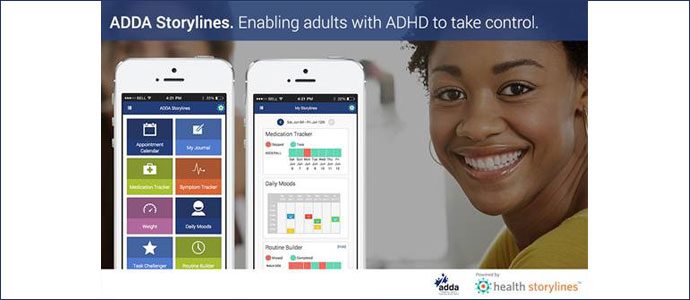
ADDA Health Storylines is a FREE app that offers a variety of digital tools to help people manage living with ADHD. It was created in collaboration with people living with ADHD as well as ADDA . Download from the Apple Store or Google Play.
National
National
Service area
About this provider
ADDA Health Storylines is a FREE app that helps you manage your ADHD with a variety of digital support tools. It was created in collaboration with people living with ADHD as well as with the Attention Deficit Disorder Association (ADDA). People who have tried ADDA Health Storylines report finding it helpful to manage their ADHD on a daily basis and like that it has been built to ensure that users’ privacy is protected.
There are many tools that you can choose from and it is up to you to choose what you want to track to best manage your ADHD. Here are some of the tools that you can use:
• ROUTINE BUILDER: Customize your own routines and track your weekly progress
• MEDICATION TRACKER: Create a list of your medications and get reminders to help you take keep on track.
SYMPTOM TRACKER: Track symptoms and view a history to see trends and patterns
• SYNC A DEVICE: Import data from other health and fitness apps that you use
• DAILY MOODS/JOURNAL: Track and understand your emotions and what might be driving them. Keep a journal as it has been shown to increase well-being.
• MY STORYLINES: View a summary of all of your inputs in one place so that you can see how you are doing. Share this summary with you doctor so he knows how you have been doing between interactions.
Susan an ADDA Health Storylines user, said: “At the beginning I used the To Do lists and the Daily Moods tracker because they really help me get a sense of how I am doing on a daily basis. I just click on a mood icon and then input why I am feeling that way. It helps me to not get totally overwhelmed by a feeling that I may be having and that helps me better manage my moods. Then, I started to use the Routine Builder. I like the way I can put in a routine that I want to create, it reminds me and I can keep track of how well I am doing keeping up with my routine through the history graphic. I also am using the Journal as it helps me makes sense of things like the mood tracker. My Storylines which summarizes all of my inputs would be valuable to take to my doctor as it is concise enough to make sense of things and I would be able to show my doctor what has been going on since the last time we met. I may be changing my medications soon and if I do the medication tracker and the symptom tracker will be very helpful for me to see how well the medication is working as you can see a direct relationship between treatment and symptoms.”
Download ADDA Health Storylines from the Apple Store or Google Play. Also available on the web at https//adda.healthstorylines.com
There are many tools that you can choose from and it is up to you to choose what you want to track to best manage your ADHD. Here are some of the tools that you can use:
• ROUTINE BUILDER: Customize your own routines and track your weekly progress
• MEDICATION TRACKER: Create a list of your medications and get reminders to help you take keep on track.
SYMPTOM TRACKER: Track symptoms and view a history to see trends and patterns
• SYNC A DEVICE: Import data from other health and fitness apps that you use
• DAILY MOODS/JOURNAL: Track and understand your emotions and what might be driving them. Keep a journal as it has been shown to increase well-being.
• MY STORYLINES: View a summary of all of your inputs in one place so that you can see how you are doing. Share this summary with you doctor so he knows how you have been doing between interactions.
Susan an ADDA Health Storylines user, said: “At the beginning I used the To Do lists and the Daily Moods tracker because they really help me get a sense of how I am doing on a daily basis. I just click on a mood icon and then input why I am feeling that way. It helps me to not get totally overwhelmed by a feeling that I may be having and that helps me better manage my moods. Then, I started to use the Routine Builder. I like the way I can put in a routine that I want to create, it reminds me and I can keep track of how well I am doing keeping up with my routine through the history graphic. I also am using the Journal as it helps me makes sense of things like the mood tracker. My Storylines which summarizes all of my inputs would be valuable to take to my doctor as it is concise enough to make sense of things and I would be able to show my doctor what has been going on since the last time we met. I may be changing my medications soon and if I do the medication tracker and the symptom tracker will be very helpful for me to see how well the medication is working as you can see a direct relationship between treatment and symptoms.”
Download ADDA Health Storylines from the Apple Store or Google Play. Also available on the web at https//adda.healthstorylines.com
Photos

Adult ADHD || ADHD support || App || support tool || routine builder || management tool || Medication tracker || Journal || mood tracker || digital management
Ratings & reviews
5
1 review
Excellent
This app really helped me feel less alone with my new diagnosis of ADHD. Tracking my moods and journaling let me feel less overwhelmed and the routine tracker has really helped me stay on track.
Log in to review this provider.